Convert 3DS to 3MF Online
Convert Autodesk 3D Studio (3DS) files to 3D Manufacturing Format (3MF), entirely in your browser. No upload, no sign-up. Your files never leave your device.
Drop your 3DS file here
or click to browse from your computer (up to 100 MB)
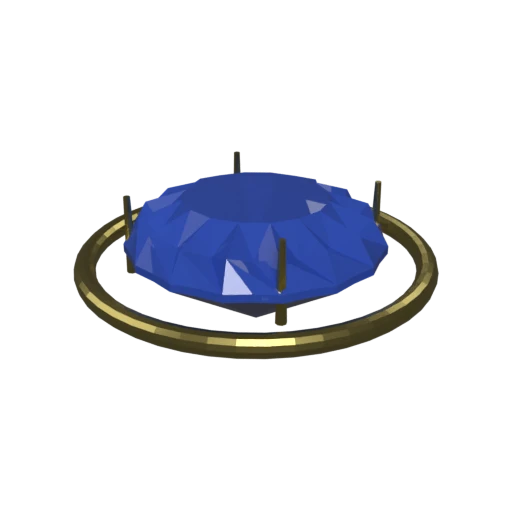
Brilliant-cut sapphire in a gold prong setting — multi-material 3DS model with faceted geometry.
3DS is a legacy format from the early 1990s with strict limitations: 65,536 vertices per mesh, 8.3 character file names, and no modern material support. Converting to 3MF brings your vintage models into a current format ready for today's 3D printers.
3DS material definitions (ambient, diffuse, and specular colors) are translated to 3MF's per-triangle color system. Surface colors from the original model are preserved for multi-color printing workflows.
3DS files cannot be opened by any modern slicer. The 3MF output is natively supported by Cura, PrusaSlicer, BambuStudio, and Simplify3D, giving your legacy model a direct path to physical fabrication.
Also convert from 3DS
Other ways to get 3MF
How to Convert 3DS to 3MF
Bring your legacy 3DS models into the modern 3MF format for 3D printing. No plugins needed.
Upload 3DS
Drag and drop or select your .3ds file. The format is self-contained so a single file is all you need.
Processing
Conversion runs entirely in your browser. Mesh geometry and material colors are extracted from the 3DS file and repackaged into the 3MF XML structure. Your data never leaves your device.
Download 3MF
Get your .3mf file containing the converted model with colors. Open it in any major slicer to position, scale, and prepare your model for printing.
Why convert 3DS to 3MF?
The .3ds format originated with Autodesk's 3D Studio for DOS in the early 1990s. It uses a binary chunk-based structure to store mesh geometry, material properties, keyframe animations, cameras, and lights. While 3DS was once the de facto exchange format for 3D content, it carries significant legacy constraints: a hard limit of 65,536 vertices per mesh due to 16-bit indexing, 8.3 character file name restrictions inherited from DOS, and a material model limited to basic Phong shading. The format has not been updated since its introduction and has been largely superseded by newer formats.
3MF (3D Manufacturing Format) was introduced in 2015 by the 3MF Consortium, whose founding members include Microsoft, HP, Autodesk, and Stratasys. It stores mesh geometry, per-triangle colors, named components, and build plate metadata in a compact XML-based OPC (ZIP) archive. Converting 3DS to 3MF rescues legacy models from an obsolete format and makes them accessible to every modern slicer. The conversion removes legacy vertex limits while preserving the geometry and color data needed for producing a physical print.
Key advantages of 3MF over 3DS for 3D printing
3MF has no per-mesh vertex count restrictions, unlike 3DS which caps each mesh at 65,536 vertices due to 16-bit indexing.
3MF is recognized by every major slicer out of the box, while 3DS requires third-party conversion before printing.
3MF can store part placement, orientation, and print settings on the build plate, concepts that the 3DS format predates entirely.
3MF is evolving under the 3MF Consortium, while 3DS has been frozen since the early 1990s with no updates or extensions.
3MF organizes multi-part models as named build items with individual transforms, replacing 3DS's flat mesh list with structured manufacturing data.