Convert OBJ to GLB Online
Convert Wavefront OBJ files to GL Transmission Format Binary (GLB), entirely in your browser. No upload, no sign-up. Your files never leave your device.
Drop your OBJ files here
Select your .obj file along with its .mtl and texture files (up to 100 MB)
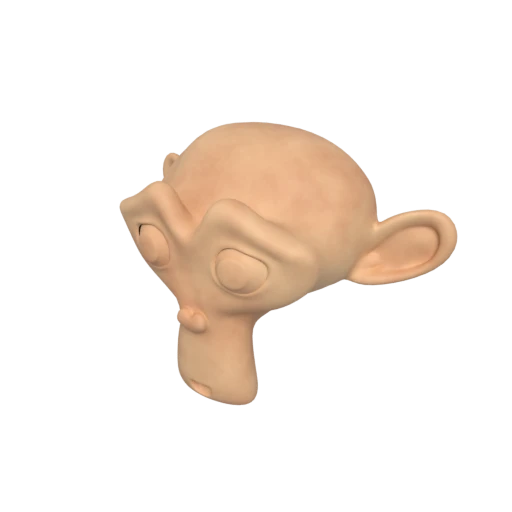
Suzanne with baked texture — demonstrates OBJ + MTL + texture conversion.
OBJ uses the legacy Phong shading model, while GLB uses physically based rendering for more realistic, consistent visuals.
OBJ only stores static geometry. GLB adds support for node hierarchies, skeletal animation, and morph targets.
GLB's binary format is significantly more compact than OBJ's plain-text ASCII, enabling faster loading in real-time applications.
Also convert from OBJ
Other ways to get GLB
How to Convert OBJ to GLB
Supports multiple files; drop your .obj, .mtl, and textures together.
Upload OBJ + Materials
Drag and drop your .obj file along with its companion .mtl file and any referenced texture images. OBJ models typically rely on separate files for materials and textures. Include them all so nothing is lost.
Processing
Conversion runs entirely in your browser. Geometry from the .obj, materials from the .mtl, and linked texture images are parsed and packed into a single self contained GLB file.
Download GLB
Get your ready to use GLB file immediately. All geometry, materials, and textures are bundled into one file; no more managing separate .obj, .mtl, and texture files.
Why convert OBJ to GLB?
OBJ (Wavefront Object) is an open ASCII text format developed by Wavefront Technologies in the early 1990s. While it is universally supported by 3D authoring tools like Blender, Maya, and 3ds Max, it stores all geometry as plain text (verbose and slow to parse) and requires a separate .mtl companion file to define materials. OBJ has no support for animation, scene hierarchy, lighting, or units.
GLB is the binary container format for glTF 2.0 (GL Transmission Format), an open standard developed and maintained by the Khronos Group. In 2022 it was ratified as the ISO/IEC 12113:2022 International Standard. GLB packages geometry, PBR (Physically Based Rendering) materials, textures, scene hierarchy, and animations into a single self-contained binary file. Its creators describe it as the "JPEG of 3D."
Key advantages of GLB over OBJ
Geometry, PBR materials, and textures bundled together (no separate .mtl required).
Smaller file sizes and faster parsing than OBJ's ASCII text.
Physically based rendering for accurate, consistent appearance across platforms and renderers.
GLB supports skeletal animation, morph targets, and object parenting; OBJ supports none.
Maintained by the Khronos Group (ISO/IEC 12113:2022), with broad industry adoption.
Natively supported by Microsoft Office and Android Scene Viewer.
OBJ vs GLB
| Feature | OBJ | GLB |
|---|---|---|
| File structure | Text .obj + .mtl + textures | Single binary file |
| Animation | Not supported | Full skeletal & morph targets |
| Materials | Phong / Lambert | PBR metallic-roughness |
| Textures | External image files | Embedded in binary |
| Compression | None (ASCII text) | Draco, meshopt, KTX2 |
| File size | Large (verbose text) | Compact binary |
| Web delivery | Not designed for web | Optimized for web & AR |
When to Use Each Format
Use OBJ when
- You need maximum compatibility with legacy 3D tools
- The file must be human-readable and editable in a text editor
- Working with simple static meshes that don't need PBR or animation
- Your pipeline or scripts expect OBJ as input
Use GLB when
- Publishing 3D content on the web with three.js, Babylon.js, or model-viewer
- You want a self-contained file with textures baked in
- You need PBR materials for realistic rendering
- File size needs to be as small as possible for download or streaming
Known Limitations
OBJ's Phong/Lambert materials are converted to PBR approximations, which may look different under realistic lighting
Non-standard PBR extensions in OBJ (Pr, Pm properties) are only partially supported across tools
OBJ has no animation data, so the resulting GLB will be a static model
Texture paths in the .mtl file must be valid and accessible at conversion time, or textures will be missing
OBJ to GLB FAQ
Do I need the .mtl file for the conversion?
The .mtl file is optional but recommended. Without it, the converter will still produce valid geometry, but all material and texture information will be missing. The result will be a plain gray mesh.
How much smaller will the GLB be compared to my OBJ?
Typically 5 to 10 times smaller. OBJ stores all data as ASCII text, while GLB uses a compact binary encoding. With Draco compression enabled, the difference can be even larger.
Will my OBJ's vertex colors be preserved?
Vertex colors in OBJ files are non-standard. Some exporters write them as extra values after each vertex coordinate. Support varies, but if present in a recognized format, they will be carried over to the GLB.
Can I add animations to the GLB after conversion?
Yes. The GLB format fully supports animation. You can import the converted GLB into Blender, Maya, or any other 3D tool and add skeletal rigs, keyframes, or morph targets.
Two Formats, Three Decades Apart
OBJ appeared around 1990 at Wavefront Technologies. It stores geometry as plain ASCII text: one line per vertex, one line per face, one line per texture coordinate. A separate .mtl file holds material definitions using the Phong reflection model. Textures live as loose image files. The spec has not changed since the early 1990s.
GLB arrived in 2017 as the binary packaging of glTF 2.0, an open standard from the Khronos Group. It bundles geometry, PBR materials, textures, animations, and a full scene graph into one binary container, ratified as ISO/IEC 12113 in 2022. Where OBJ was designed for offline rendering workstations, GLB was designed for GPUs, browsers, and real time applications.
What You Gain
- One file instead of many. OBJ models ship as a bundle: .obj geometry, .mtl materials, and separate image files for every texture. Lose one piece and the model breaks. GLB packs everything into a single binary.
- Smaller file sizes. OBJ encodes vertex data as ASCII decimal strings. A floating point number takes 8 to 12 bytes as text; the binary equivalent takes 4. A typical OBJ shrinks 5x to 10x as GLB. With Draco compression, reductions above 90% are common.
- PBR materials instead of Phong. The MTL format uses ambient, diffuse, and specular colors with a shininess exponent. This Phong model dates from the 1970s. GLB uses metallic-roughness PBR, which produces physically plausible results across renderers without per-engine tweaking.
- GPU-friendly data layout. OBJ uses independent index arrays for positions, normals, and UVs. A renderer must deduplicate and reindex this data before GPU upload. GLB stores interleaved vertex attributes in typed buffer views that map directly to GPU buffers.
- A path to animation. OBJ is frozen geometry. GLB supports skeletal animation, morph targets, and keyframe tracks. Converting now means you can rig and animate later without yet another format change.
What You Lose (or Risk Losing)
- Material fidelity shifts. The converter maps Phong properties to PBR values. Kd (diffuse) becomes baseColor, while Ks (specular) and Ns (shininess) approximate metallic and roughness. This works for simple materials but can misfire on surfaces with colored specular highlights. If your exporter wrote Pr and Pm properties (Blender does this), the mapping is much cleaner.
- Human readability disappears. You can open an OBJ in a text editor and change a vertex coordinate by hand. GLB is binary. Inspecting or scripting against the file requires tools like glTF Transform.
- Polygons get triangulated. OBJ supports quads and n-gons. GLB requires triangles. The converter triangulates automatically, which can increase face count and alter topology.
- Legacy tool compatibility drops. Some older CAD programs, CNC toolpath generators, and academic software only read OBJ or STL. If your downstream tool has not adopted glTF, keep an OBJ copy.
How the Material Upgrade Works
The Phong model treats surfaces as combinations of ambient, diffuse, and specular reflection. PBR metallic-roughness splits them into metallic conductors and dielectric insulators using two scalar parameters: metallic and roughness. These describe light behavior in fundamentally different ways.
During conversion, diffuse color (Kd) and its texture (map_Kd) transfer to baseColorFactor and baseColorTexture. The specular exponent (Ns) is inverted to a roughness value: high shininess produces low roughness. Specular color (Ks) feeds a metallic estimate: dark or absent Ks yields metallic near zero, bright Ks pushes it higher.
This heuristic handles common materials well. Matte plastic, painted wood, and simple textured surfaces convert cleanly. Problems appear with colored specular highlights on non-metallic surfaces, something Phong allows but metallic-roughness PBR does not. The fix is to adjust materials after conversion in Blender or a similar tool. For most web and AR use cases, the automatic mapping is accurate enough without manual correction.
Where This Conversion Matters Most
Web delivery is the primary driver. Three.js, Babylon.js, and Google's model-viewer all treat GLB as their default input format. Loading an OBJ in the browser means fetching the .obj, the .mtl, and every texture as separate HTTP requests. One GLB replaces all of that.
AR is the second major use case. Android Scene Viewer and Meta's 3D posts expect GLB. Apple's AR Quick Look prefers USDZ, but many pipelines use GLB as an intermediate step. For a catalog of OBJ files from a scanning pipeline, GLB is the fastest path to AR.
Game engines and e-commerce round out the list. Unity and Unreal import GLB natively. Shopify, Google Shopping, and Amazon all accept GLB for product visualization. A retailer with thousands of OBJ models can convert the catalog and deploy interactive 3D previews on product pages without rebuilding anything.