Convert OBJ to FBX Online
Convert Wavefront OBJ files to Autodesk FBX (Filmbox), entirely in your browser. No upload, no sign-up. Your files never leave your device.
Drop your OBJ files here
Select your .obj file along with its .mtl and texture files (up to 100 MB)
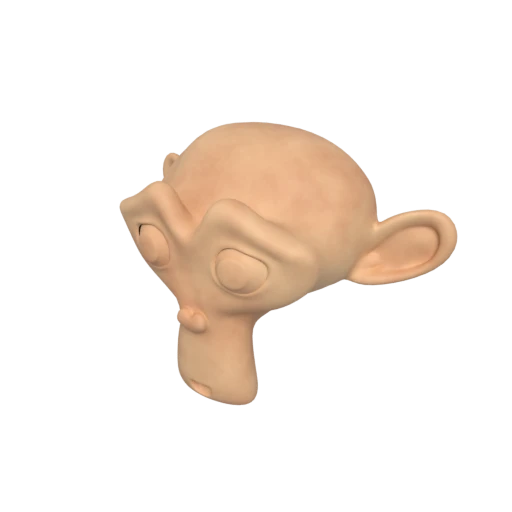
Suzanne with baked texture — demonstrates OBJ + MTL + texture conversion.
OBJ stores only static geometry. FBX supports skeletal rigs, blend shapes, keyframe animation, and scene hierarchy, making it ready for character and motion workflows.
FBX is the preferred import format for Unity and Unreal Engine. Converting from OBJ lets you bring legacy models into modern game development pipelines without manual rework.
While OBJ is limited to Phong shading via .mtl files, FBX carries advanced material definitions, embedded textures, and multiple UV sets used in film and game production.
Also convert from OBJ
Other ways to get FBX
How to Convert OBJ to FBX
Upload your .obj, .mtl, and textures together for a complete conversion.
Upload OBJ + Materials
Drag and drop your .obj file along with its companion .mtl file and any referenced texture images. OBJ models typically rely on separate files for materials and textures. Include them all so the conversion preserves your materials.
Processing
Conversion runs entirely in your browser. Geometry, materials, and textures from your OBJ bundle are parsed and written into a single FBX binary file with no data sent to any server.
Download FBX
Get your ready to use FBX file immediately. The result can be imported directly into Unity, Unreal Engine, Blender, Maya, 3ds Max, and other DCC tools.
Why convert OBJ to FBX?
OBJ is an open ASCII format from Wavefront Technologies dating to the early 1990s. It excels at simple geometry interchange and is supported by virtually every 3D application, but it cannot store animation, rigs, scene hierarchy, or modern material data. Projects that start with OBJ assets often hit a wall when they need to add motion, rigging, or import into game engines that expect richer formats.
FBX, originally developed by Kaydara and now a proprietary format owned by Autodesk, is the de facto interchange format in game and film production. It carries meshes, materials, skeletal rigs, blend shapes, keyframe animation, cameras, and lights in a single binary file. Unity and Unreal Engine both treat FBX as their primary mesh import path. Converting OBJ to FBX gives static models a direct route into these production pipelines, with all geometry and material data intact and ready for rigging or animation.
Key advantages of FBX over OBJ
FBX stores skeletal rigs, blend shapes, and keyframe animation that OBJ cannot represent.
Unity and Unreal Engine import FBX natively with material, mesh, and animation splitting built in.
Geometry, materials, and embedded textures travel in one file instead of OBJ's multi file bundle.
FBX supports node trees, pivot points, and transform inheritance for complex scene organization.
FBX can carry several UV channels per mesh, enabling lightmap and detail map workflows.
Maya, 3ds Max, Blender, Cinema 4D, and MotionBuilder all use FBX as a primary exchange format.
OBJ vs FBX
| Feature | OBJ | FBX |
|---|---|---|
| File structure | Text .obj + .mtl + textures | Binary or ASCII (single file) |
| Animation | Not supported | Full skeletal, morph, keyframe |
| Materials | Phong / Lambert | Phong / Lambert (similar) |
| Textures | External files only | Can embed textures in binary |
| Scene hierarchy | Flat groups only | Full node hierarchy |
| Specification | Open (de facto standard) | Proprietary (Autodesk) |
| File size | Large (ASCII text) | Compact (binary encoding) |
When to Use Each Format
Use OBJ when
- Maximum compatibility across 3D tools is the priority
- You want a simple, text-based format you can inspect by hand
- Working with static geometry that doesn't need animation or hierarchy
- Feeding data into processing scripts or custom pipelines
Use FBX when
- Importing into Unity, Unreal Engine, or other game engines
- You plan to add skeletal animation or rigs later in the pipeline
- Working with Autodesk tools like Maya, 3ds Max, or MotionBuilder
- You need a compact binary format instead of verbose ASCII text
Known Limitations
OBJ has no animation, so the resulting FBX will be static unless you add animation afterward
Material conversion is fairly clean since both formats use Phong shading, but some property names differ between tools
OBJ groups are converted to FBX nodes, but there's no true hierarchy in OBJ, so the result is a flat list
Texture paths must be valid at conversion time. Broken or absolute paths in the .mtl will result in missing textures
OBJ to FBX FAQ
Will my materials transfer correctly from OBJ to FBX?
In most cases, yes. Both formats use similar Phong-based material models with ambient, diffuse, and specular properties. Colors and basic texture maps should transfer cleanly. However, non-standard PBR extensions in OBJ may not map to FBX equivalents.
Can I rig and animate the FBX after conversion?
Absolutely. FBX fully supports skeletal animation, blend shapes, and keyframe animation. Converting your OBJ to FBX gives you a format that's ready for rigging in tools like Maya, Blender, or MotionBuilder.
Is FBX better than OBJ for game development?
For game engines, yes. FBX is the standard import format for Unity and Unreal Engine. It supports animation, hierarchies, and embedded textures, all of which OBJ lacks.
Will the file size change?
Binary FBX files are significantly smaller than OBJ because FBX uses a compact binary encoding instead of ASCII text. The geometry data is the same, but the storage is much more efficient.